Early Release · Open Source · Anthropic + OpenAI

One platform.
Five ways to work
with AI.

onKaul is an open-source AI developer platform with a pluggable intelligence core — investigate incidents in Slack, triage Jira tickets, build in the browser with an embedded coding agent, and pair-program with teammates in real time.

Connect Sentry, Datadog, GitHub, Jira, and Confluence once. Then ask from anywhere — a Slack thread, a Jira comment, the CLI, or the web UI. The bee-worker queue handles the rest asynchronously, so your team never waits for a response.

Slack Bot Jira Bot CLI Web Chat Sandbox
Five ways to use it

One platform. Every workflow.

onKaul meets you where you already work — no new tools required.

💬

Slack Bot

Team

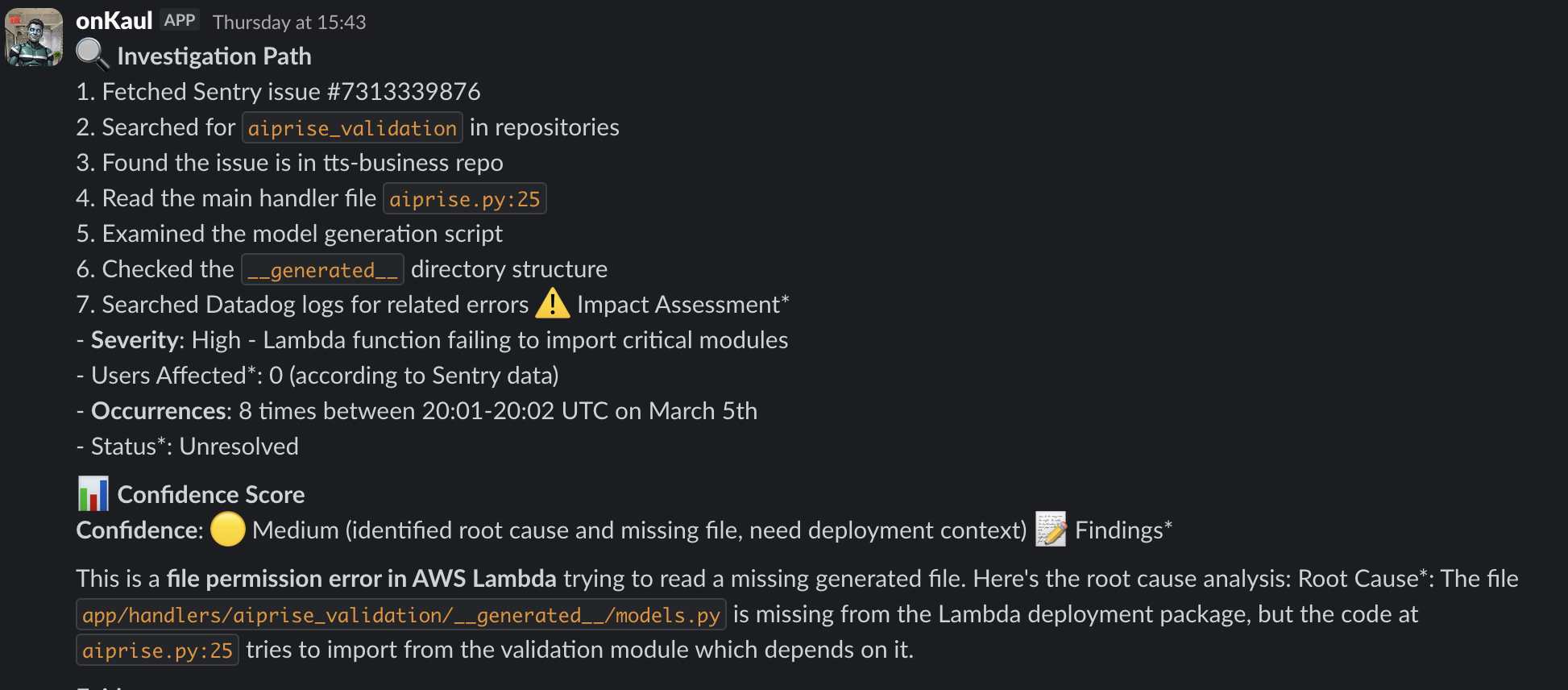
Mention @onkaul in any Slack thread. The bee-worker picks it up, runs a full investigation (Sentry → Datadog → code), and replies in the thread with citations.

  • Full thread context included automatically
  • File attachments processed (PDF, images, text)
  • Async — never blocks your workflow
  • HMAC-SHA256 signature verification
onKaul responding in a Slack thread
🎫

Jira Bot

Team

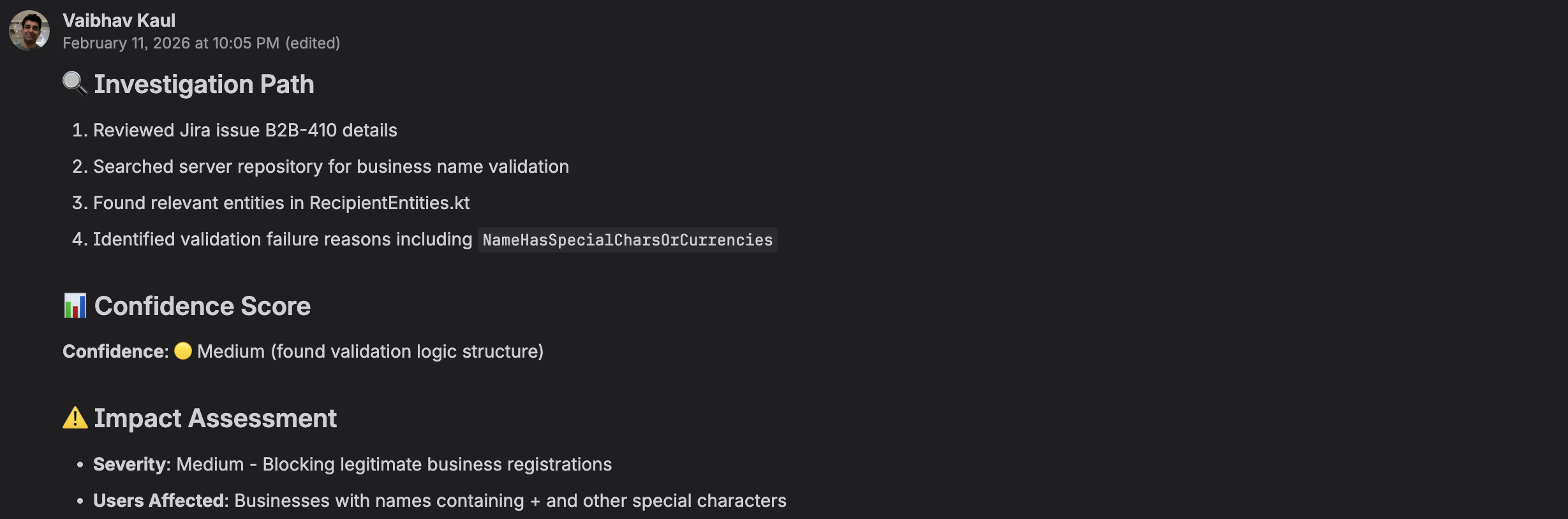
Comment @onkaul on any Jira ticket. onKaul reads the issue, correlates logs and errors, and posts a formatted reply using Atlassian's ADF — proper headings, code blocks, bold.

  • Full issue context (status, comments, assignee)
  • Markdown → ADF conversion for proper formatting
  • JQL search to find related issues
  • Webhook secret verification
onKaul comment on a Jira ticket
⌨️

CLI

Solo

Run uv run onkaul for a local interactive shell. No webhooks, no Slack — just you and the agent. Comes with a setup wizard to configure all integrations.

  • Interactive onkaul> prompt
  • /setup wizard for all integrations
  • Streaming responses in terminal
  • Same 18 tools as web/Slack modes
$ uv run onkaul
onKaul v0.x — type /help for commands
onkaul> why is checkout timing out in prod?
🔍 Querying Sentry for checkout errors…
📊 Pulling Datadog logs (last 1h)…
Found root cause in payment-service/retry.py:143
🌐

Web Chat

Solo + Team

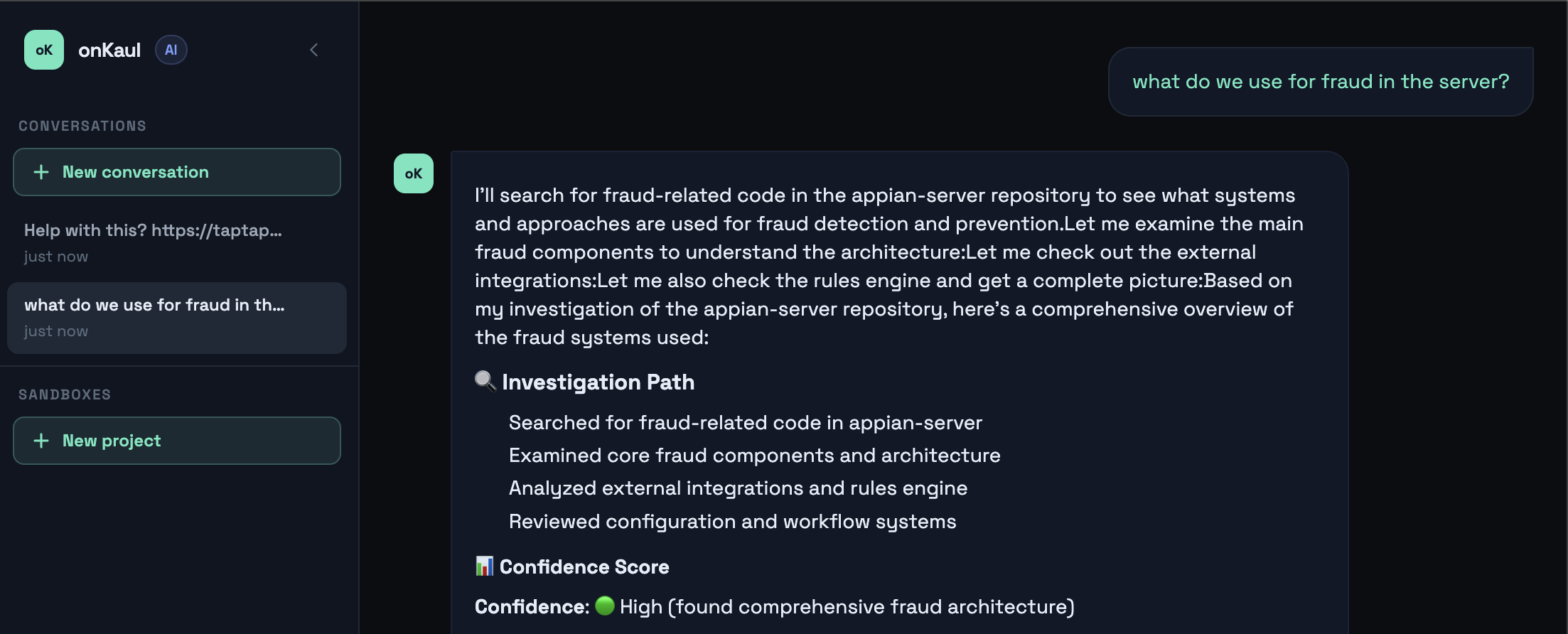
A full browser-based chat interface with streaming SSE responses, persistent session history, and multi-user support. Works out of the box with your repo config.

  • Streaming SSE responses (token by token)
  • Session history with Redis persistence (24h)
  • Multiple conversations per user
  • Auto-titles sessions from first message
onKaul web chat interface
Cloud Sandbox

A browser IDE where your coding agent has full control

Every sandbox is an isolated Docker container. Open it, start the coding agent in the terminal, and describe what to build. The live preview updates on every file save. Share a link — your collaborator joins the same session in real time.

Agent auto-launches

Opens with bypassPermissions — reads, writes, and runs files immediately. No confirmation prompts.

🔄

Hot reload

SSE file watcher triggers iframe reload on every save. Preview stays in sync with the agent's edits.

👥

Multiplayer

Share a token URL. Guest gets the same live preview + joins the same tmux session — real-time pair coding.

📱

Device preview

9 presets from 4K to Galaxy S24. Each viewer picks independently — no sync required.

🚀

Push to PR

Creates a new branch, commits all changes, pushes, and opens a GitHub PR — from a single button.

📁

Three project types

Static HTML, Vite/React, or Fullstack (Vite + FastAPI). Or connect an existing GitHub repo.

📤

Asset upload

Drop images and files (up to 20 MB each) directly into the sandbox. The agent can reference them immediately.

🔗

Link any repo

Start from scratch, then link a GitHub repo. Or open an existing configured repo directly.

🔒

Isolated containers

Each sandbox runs in its own Docker container. No host access — the agent operates inside the container only.

Architecture

A swarm of bee workers behind every request

When you @mention onKaul in Slack or Jira, the request is queued via Redis RQ and picked up by a bee-worker process. Workers run investigations asynchronously — your thread gets a response when it's ready, without blocking anything.

Scale horizontally by running more workers. Each worker processes one job at a time and logs everything to JSONL for observability.

FastAPI Redis RQ Bee Workers Docker Sandbox tmux Multiplayer SSE Streaming
18 built-in tools

Everything the agent needs to investigate and fix

Monitoring
Sentry — issues, stacktraces, frequency
Datadog — logs, monitors, metrics, incidents
Datadog events — deployments, config changes
Code
GitHub — code search across repos
GitHub — read files, browse directories
GitHub — create and close PRs
Issue Tracking
Jira — JQL search
Jira — full issue details + comments
Knowledge
Confluence — pages, playbooks, RFCs
Brave Search — external research
Fix & Ship
Headless coding agent (Claude / Codex) — write + apply diffs
Auto-commit, push branch, open PR
Update existing PR branches
Attachments
PDF text extraction
Image OCR from Slack uploads
Plain text file processing
Two paths, one platform

How it works

Build — Sandbox
01

Open a sandbox

Pick a configured repo or create a new project (Static, Vite, or Fullstack). Container starts in seconds.

02

Agent codes it

Start the coding agent in the terminal. Describe what you want. Preview updates live on every save.

03

Share or ship

Send a share link for live pair-coding, or push to a new GitHub branch and open a PR — right from the UI.

Investigate — AI Agent
01

Connect your tools

Run /setup in the CLI or set env vars. Add Slack, Jira, Sentry, Datadog, GitHub, Confluence.

02

Ask anywhere

Mention @onkaul in Slack or Jira. A bee worker picks it up, runs the investigation, and replies.

03

Ship the fix

Approve a plan, then let the agent write the code, push a branch, and open a PR automatically.

Founder note

Why I built onKaul

Being on call was draining the time and focus I wanted to spend building for customers. The issue was never the work itself — it was the constant context switching and cognitive overhead.

onKaul started as a personal project to break that cycle. After talking with my friend Charlie DiGiovanna, I decided to host it in the cloud and build it in the open.